Rethinking UI in Agent-Driven Systems
Chat interfaces have surged in popularity, becoming a common entry point to intelligent systems. But while text excels at expressiveness and simplicity, it's often limiting for structured interactions. Booking a meeting, selecting options, or reviewing results all demand more than just words. The immediate solution that comes to mind is to render traditional user interfaces (components) inside the agentic system, but what does that look like in practice?
What are the viable strategies for embedding UI into chat-driven workflows? And even better: should you be embedding UI at all? If so, will these new approaches eventually replace traditional interfaces, or simply augment them?
In this article, we are going to look at the three emerging strategies for returning UI from agents:
These modes reflect not just technical choices but broader design philosophies about how software should be delivered when the interface becomes a dialogue, not a static representation of data.
Each approach solves the "how do I show a button" problem differently. In fact, they solve different problems altogether, but it’s easy to mix and confuse these approaches due to their similarities.
1. First-Party UI Rendering: Components from Within
This is the simplest to understand and implement if you own both the agent and the application frontend.
The tool (or function) returns a UI descriptor that directly maps to a component you already have in the client codebase. In some systems, this means passing back a component name and props. In others, it may be fully serialised elements.
// Example: a tool response returning a UI
{
  type: "tool-response",
  tool: "getUserApproval",
  content: ["ok", {...}, {
    type: "custom",
    component: "ApprovalBanner",
    props: { user: "alice", reason: "dangerous command" }
  }]
}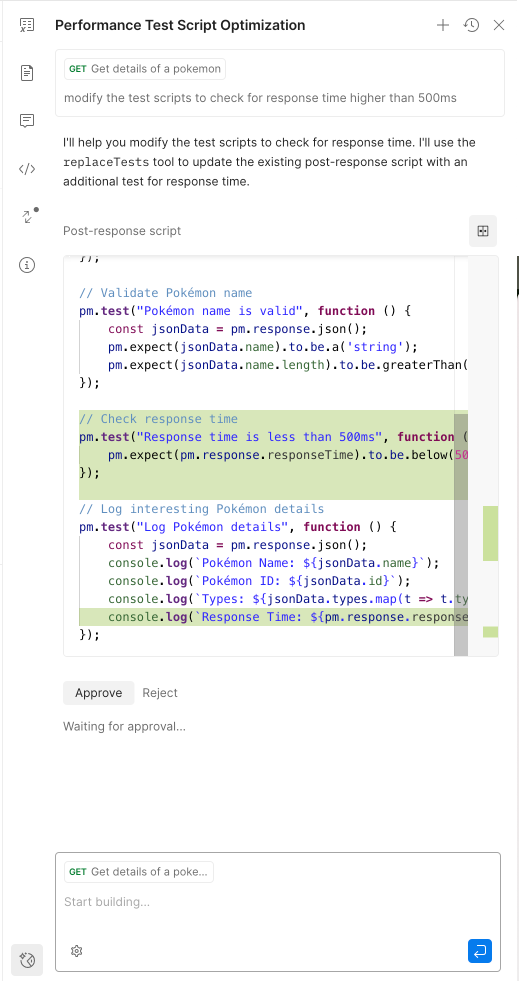
This flexibility not only allows for reusing and rendering existing UI, but also unlocks new interaction patterns like "driving the UI from the agentic system."
Here is an example of what this looks like in practice:
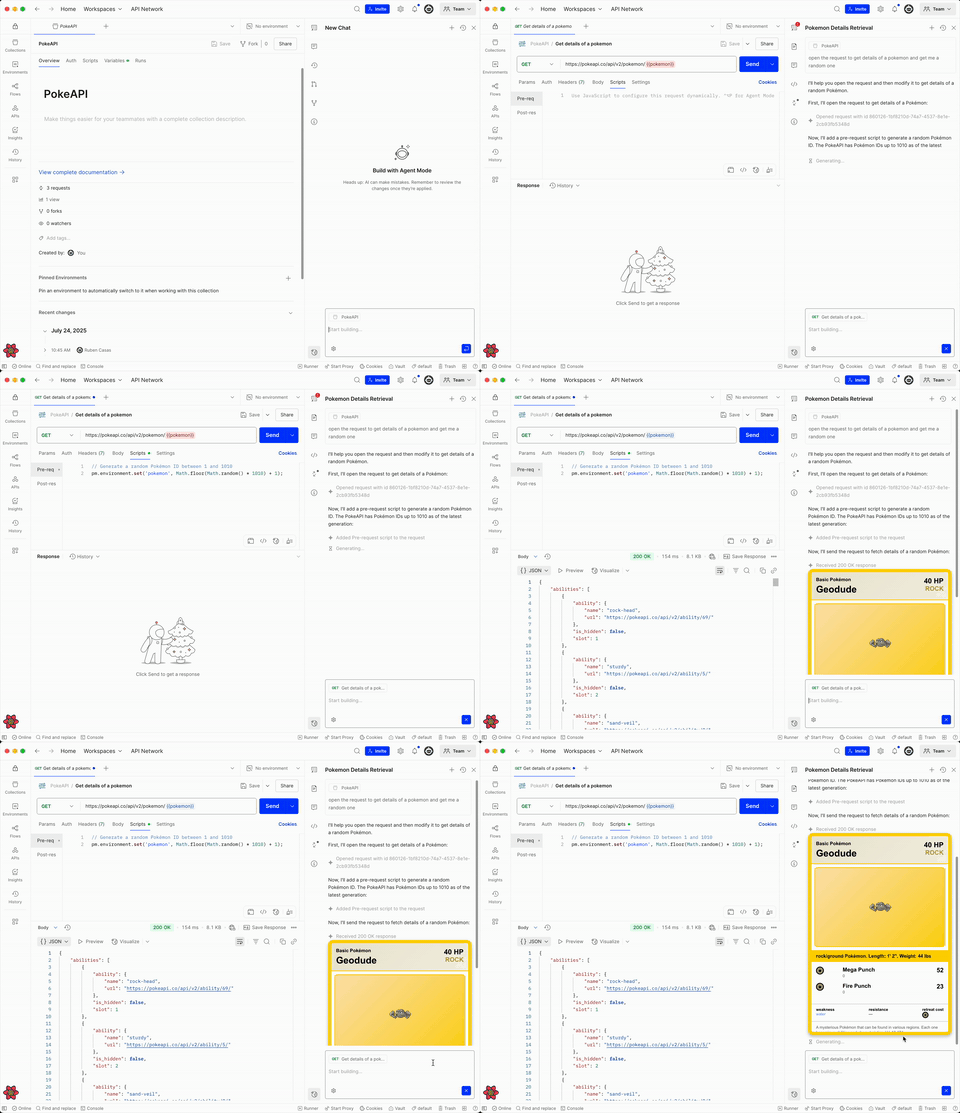
This demo showcases the agent driving the user interface like if it was a human agent. It opens a requests in a new tab, changes some scripts, sends the request and then displays the results in a nicely formatted component.
Pros
Cons
Ideal for:
Examples:
2. Third-Party UI: Server-Generated UI Delivered via MCP
The rise of the MCP protocol has made it easier for third-party tools to plug into assistant ecosystems, enabling remote invocation and integration. However, one limitation is that most implementations today focus on returning plain text. That works well for many workflows, but it quickly breaks down when richer user interaction is needed.
What if a third-party MCP tool wants to return a map, an interactive widget, or a custom data viewer? That's where third-party UI comes in.
Instead of returning components, the tool responds with plain HTML or structured and serialised components that describe what should be rendered. The client, which speaks the schema format, interprets and renders the UI. This adds an interactive layer on top of otherwise text-only conversations, unlocking a much richer experience.
Frameworks like mcp-ui, Adaptive Cards, and Remote DOM are converging here:
The server describes the what, and the client decides how.
Plain text example:
{
  "type": "resource",
  "resource": {
    "uri": "ui://my-component/instance-1",
    "mimeType": "text/html",
    "text": "<p>Hello World</p>"
  }
}
Remote resource example:
{
  "type": "resource",
  "resource": {
    "uri": "ui://analytics-dashboard/main",
    "mimeType": "text/uri-list",
    "text": "https://my.analytics.com/dashboard/123"
  }
}
Remote DOM example:
{
  "type": "resource",
  "resource": {
    "uri": "ui://remote-component/action-button",
    "mimeType": "application/vnd.mcp-ui.remote-dom+javascript; framework=react",
    "text": "\n  const button = document.createElement('ui-button');\n  button.setAttribute('label', 'Click me for a tool call!');\n  button.addEventListener('press', () => {\n    window.parent.postMessage({ type: 'tool', payload: { toolName: 'uiInteraction', params: { action: 'button-click', from: 'remote-dom' } } }, '*');\n  });\n  root.appendChild(button);\n"
  }
}
*This schema uses the official MCP specification. There is a proposal under discussion to add a specific type of resource for UI, however the mcp-ui library is full spec compliant.*The client receives the response from an MCP tool invocation, reconstructs the UI, and renders it in the agent’s host using the preferred rendering method. The client ensures the UI is mounted inside a secure and sandboxed environment like an iframe or a worker.
To match styling, reuse component libraries, and support frontend frameworks of choice, tools like Remote DOM help bridge the gap while keeping the server implementation generic.
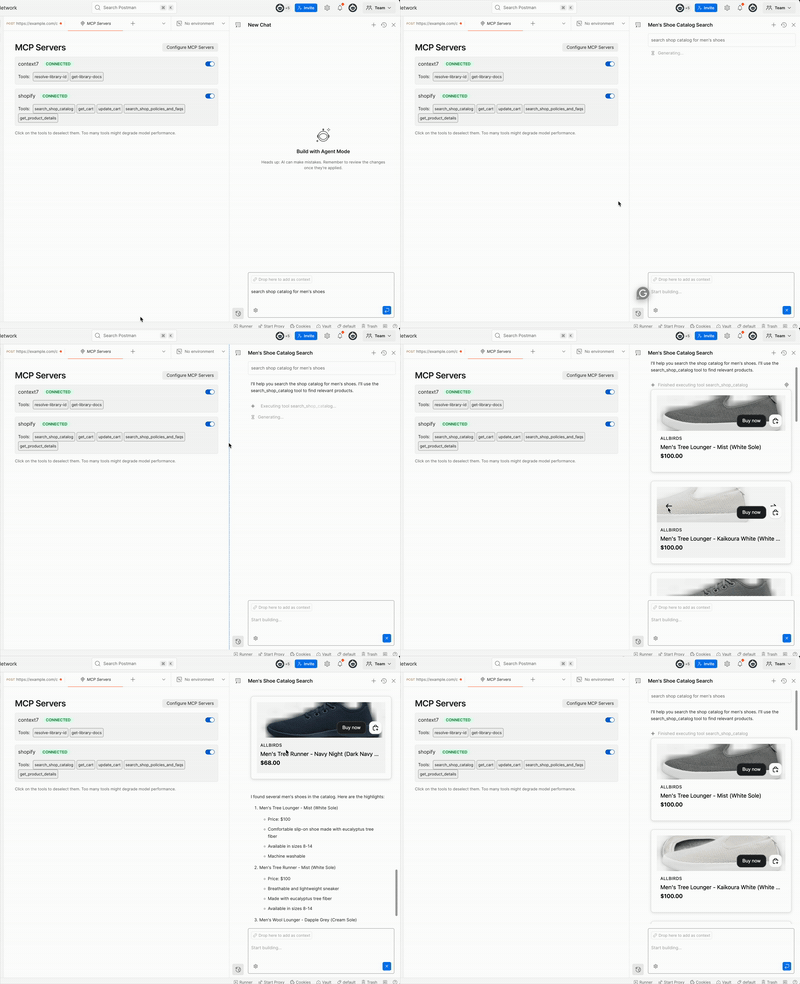
This demo uses the mcp-ui library to send UI components from a shopify store via the Model Context Protocol (MCP)
Pros
Cons
Ideal for:
Examples:
3. Generative UI:
This is the most speculative and also the most exciting approach. Instead of explicitly returning UI, the LLM generates it directly from the conversation context, injecting the data into interactive elements, not just for display, but for action.
What makes generative UI especially powerful is how it mirrors the trend of vibe coding where users or agents compose small applications on the fly to solve personalised tasks. This goes beyond prompting or one-off responses. It becomes a way of assembling functionality contextually.
With the right schema and execution model, generative UI isn’t just a mockup, it becomes a live surface inside the agentic loop: capable of executing functions, calling tools, validating input, and even interacting with third-party systems via the MCP protocol.
Imagine a scenario where the agent, based on context and goals, produces a multi-step workflow UI part form, part calendar, part dashboard. The user fills it in, submits it, and the agent takes action, all within a single conversational pass.
This bridges the gap between unstructured input and structured actions. It unlocks a middle layer of interaction too fluid for hardcoded UIs and too structured for plain text.
User: "I want to send flowers to someone in Berlin on Tuesday"
The LLM could generate a UI like so:

Generative UI will most likely be implemented as an extension of first-party UI due to the control and sandboxing requirements involved in running generated code safely. An interesting approach could involve using **“sampling”** from the Context Model Protocol specification to dynamically request UI from the active agent.
That said, third-party tools can also leverage generative UI. Backend systems can use LLMs to create UIs on the fly and return the resulting schema or code as a valid response—so long as it complies with what the client expects.
This demo by Evan Bacon uses an LLM to interpret natural language queries and determine which components to display based on the responses.
Pros
Cons
Ideal for:
Choosing a Strategy
You don't need to pick one. These strategies are complementary and solve different use cases.
At Postman, the agentic system we’re building supports a mix of all three:
mcp-ui package to render UI from MCP servers. This supports both our Agent Mode and the MCP Inspector tool for debugging UI responses.Final Thoughts
Just like designers had to rethink shape and granularity in the age of mobile, we now need to rethink UI in the age of agents.
Not every assistant needs to return UI. But once it does, the architecture behind that decision becomes a core part of your product surface. It affects what tools you can build, how partners can extend your system, and how safely and reliably users can interact with it.
Ooops! nearly forgot… I didn’t dive deep into the question should you be embedding UI at all? That probably deserves a separate article.